Features & Benefits
Schedule Your Employees - Anytime, Anywhere!
Schedule your employees from any computer, 24/7!
ScheduleAnywhere is the easy and affordable employee scheduling system that lets you manage your employees'
work schedules via the Internet. Designed by Atlas Business Solutions, makers of the number one PC-based
employee scheduling software, ScheduleAnywhere uses state-of-the-art software technology that's proven
to make employee scheduling simple and painless.
ScheduleAnywhere makes it possible to schedule your employees from any computer with an Internet browser,
giving you unparalleled scheduling flexibility and power. Managers and employees can view and print
schedules online, as well as submit time-off requests, which makes communicating work schedules easier
and saves you time.
Back to Top
Easy to Set Up and Use
Fast set up and easy scheduling
Start scheduling your employees online in minutes. Just create a FREE ScheduleAnywhere trial account
and follow the easy, step-by-step interview and instructions. If you have any questions about setting
up an account, please call 1-800-874-8801. We're here to help!
Sign up now for a FREE 30-day trial.
With ScheduleAnywhere, everything you need to schedule your employees is right at your fingertips.
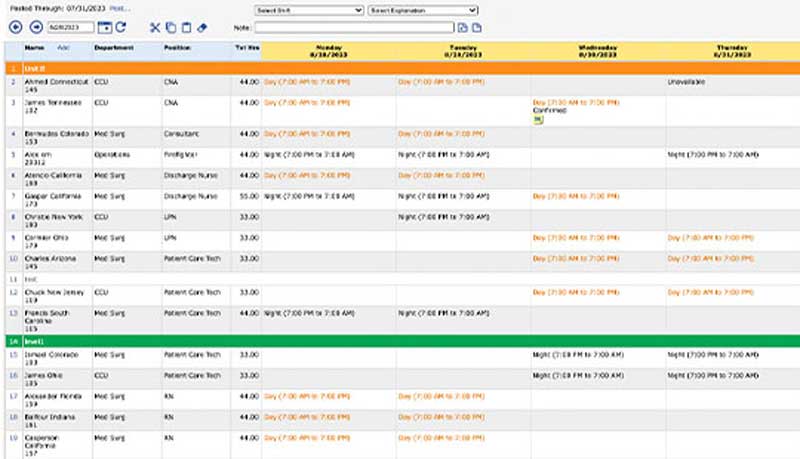
Your employees' names are listed along the left side of the screen. If your employees work in departments,
or have specific positions, this information appears next to the employee's name. The Total Hours column
shows you how many hours an employee is scheduled and helps reduce overtime.
Schedule your employees within the scheduling worksheet. Separate groups of employees by adding dividers
to your schedule. If you have staffing requirements, you can enter them into the schedule by shift,
position, department, or location, and see whether you're over- or under-scheduled. ScheduleAnywhere
tracks the number of employees or hours you have scheduled.
You can schedule employees by locating them on the schedule and selecting the day(s) you wish to schedule.
Use it to assign individual work shifts, shift patterns or rotations, and track time-off. ScheduleAnywhere
is packed with powerful functions and tools to make employee scheduling easy.
If your employees work in multiple departments or locations, their names can appear on more than one
schedule. ScheduleAnywhere automatically prevents overlapping shifts. By listing an employee on two
different schedules, other managers will know when and where an employee is scheduled to work even
if it's not in their department or location.
Back to Top
Create Custom Views and Schedules
See what you need to see
ScheduleAnywhere allows you to set up an unlimited number of custom schedules. Create a schedule for
each of your locations or departments, as well as create schedules by position or shift. To switch
schedules, just select the name of the schedule you wish to view.
You can schedule your employees from one of four different views. Choose a one-day view, a 7-day view,
a 14-day view, 28-day, or 42-day view. To view a different scheduling period, press the next or previous
buttons, or enter the date you wish to view and press the Go button.
Using ScheduleAnywhere to create schedules by position, department, or location is as simple as adding
names to a schedule, plus you can create unlimited schedules. You can view all employees in your company
or view employees by position, department, or location, or create your own custom view.
Creating custom schedules is easy
The Highlighter tool allows you to add background colors to specific items on the schedule. Using the
Highlighter, you can easily identify schedule cells that match your criteria. For example, if want
to emphasize employees scheduled for vacation or sick time, you can easily create a highlighter called "Vacation" or “Sick” and
apply it to the schedule.
To view specific schedule information, you can apply a filter. Use filters to see only those employees
scheduled a particular shift, or employees scheduled time off. Filters can also show you who is not
scheduled. This is helpful when an employee calls in sick and you need to find a quick replacement.
Back to Top
Save Time with Fast and Easy Tools
Timesaving tools make online employee scheduling easy
ScheduleAnywhere is the fastest way to schedule your employees. It saves you time by letting you schedule
multiple employees in one easy step. You can copy schedules or rotations so you don't need to re-enter
redundant or repeating work schedules, and much more! ScheduleAnywhere gives you the power to manage
your employees' schedules and achieve your staffing goals.
Simply hover over the employee name on the left side with your mouse to see employee details. If the
employee’s work phone, home phone or email information is listed in their employee set up information,
this information will appear on screen as a popup tool tip.
Access employee contact information in the scheduling window
Full Screenshot
Back to Top
Control Overtime
Reduce your labor cost
Avoid scheduling unnecessary overtime. From each schedule view, you can see how many hours an employee
is scheduled. By displaying total hours on-screen, you will be able to better manage your employees'
work schedules and reduce your labor expense.
Back to Top
Enter Staffing Requirements and View Coverage
See how many employees are scheduled and if you're covered
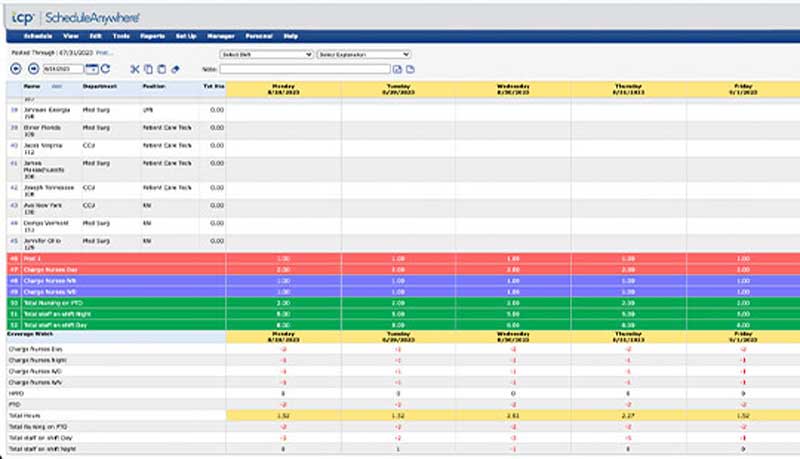
Do you need to maintain specific staffing requirements? Do you need to know how many people or hours
you have scheduled by position, shift or department? If so, ScheduleAnywhere is right for you!
Enter your staffing requirements and instantly see whether you have too few or too many employees scheduled.
When employees call in sick or go on vacation, see how it affects your coverage.
See if you're covered
Define employee skills
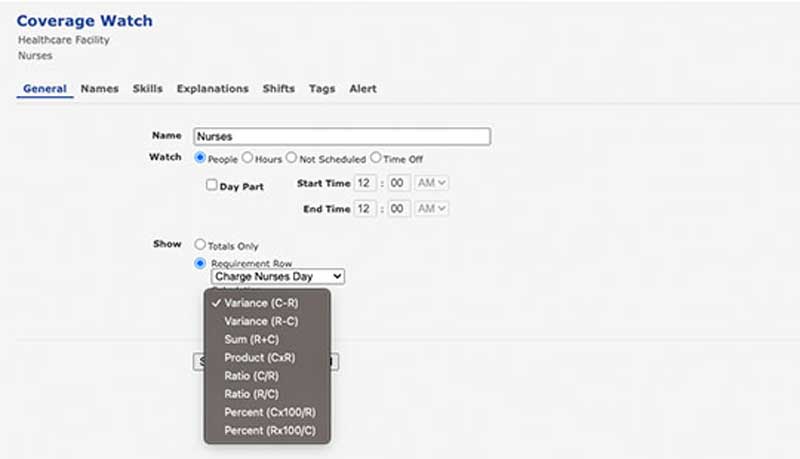
You can use Skills to track employee attributes, such as skills, training, and certifications. You
can set up Coverage Watches or Filters to determine the appropriate personnel to be scheduled. For
example, you can set up a Coverage Watch to track the number of employees scheduled with CPR certification,
or speak Spanish. You can set an expiration date for each skill, and the employee’s
manager will receive a reminder notification 90 days before the skill expires.

Full Screenshot
Many of today's businesses schedule overlapping shifts to increase staff coverage during peak times. With ScheduleAnywhere, you'll always know if you're covered. View the number of employees you have scheduled by hour, half-hour, 15-minute, 10-minute or 5-minute increments. Use filters to check coverage by shift, position, department, or location. The Labor Hours chart shows how labor hours are distributed throughout the day.
Back to Top
Employees can view Work Schedules and Request Time Off
Allow employees to see when they work. Take charge of time off.
You can give employees read-only access to ScheduleAnywhere so they can view their work schedules.
Employees can view and print their individual schedules or any staff schedule. Managers can view and
print employee schedules.
Employees can also be given permission to request time off online. When an employee requests time
off, you will be able to see if a time-off request conflicts with any previously scheduled shifts and
accept or deny the request. If you approve the request, the employee's schedule will be updated automatically.
Employees are notified of any time-off approvals or denials upon login.
Back to Top
Share Schedules and Communicate with other Managers
Let others schedule your employees. Send managers important messages.
Share schedules with other managers so they can oversee your employees when you're not available. ScheduleAnywhere
lets other managers make changes to your schedule and lets you see the changes they've made.
ScheduleAnywhere includes a built-in messaging system that allows you to communicate with other managers
and review time-off requests. Managers can notify each other about employee availability and other
schedule-related information. If a manager has been sent a notification or time-off request, the notification
will automatically appear the next time the manager logs into ScheduleAnywhere.
Back to Top
Print Schedules and Reports
Customize schedules and reports for any time frame
If you don't want to give your employees access to ScheduleAnywhere, or if your employees don't have
Internet access, you can print and post any work schedule. Schedules can be printed by employee, position,
shift, department, or location, and for any time frame.
Searching for schedule information is easy! In seconds, you can see how many vacation days or sick
days an employee has taken. Check to see how many times an employee has been scheduled a particular
shift or been assigned a specific job. With a few clicks of your mouse, you can create customized search
reports, putting important schedule information at your fingertips.
The Total Hours report sums the total hours scheduled, and calculates employee utilization and efficiency
for a given work period. The Total Hours report displays the schedule name, specified date range, filters
that may have been selected, and any shifts for the selected period.
The Estimated Cost report is used to calculate hours scheduled and to provide an estimate of labor
costs for a given work period. The Estimated Cost report displays the schedule name, specified date
range, filters that may have been selected, and any overtime adjustment factors that were used to set
up the report.
Back to Top
Use Proven Technology from the Leader in Employee Scheduling Software
Get the peace of mind you deserve
Have you ever felt like the company you've purchased something from might not be there if you ever
have a problem? Well, rest easy! ScheduleAnywhere is backed by Atlas Business Solutions (ABS), a leading
developer of easy-to-learn, easy-to-use, and affordable business software. ABS has been in business
since 1991 and currently supports over 70,000 scheduling software customers.
ScheduleAnywhere is based upon the features and functions of Visual
Staff Scheduler® Pro, the #1 employee scheduling software. This means ScheduleAnywhere uses
state-of-the-art scheduling software technology that's proven in the "real world" and backed
by a company committed to serving the scheduling needs of its customers. ABS is constantly researching
better methods and processes to help make scheduling easier for you.
Back to Top
Ideal for Small Businesses and Large Corporations
Big or small ScheduleAnywhere fits the bill
Who does the scheduling in your company? Does one person do your employee scheduling or do individual
managers schedule their own employees? Regardless of how your company does its employee scheduling,
ScheduleAnywhere works for all types of companies and all kinds of scheduling situations. Whether you
have one location or many, ten employees or 10,000, ScheduleAnywhere will meet your needs.
Back to Top
Eliminate Upgrades and Technical Headaches
Maintaining your scheduling software is our top priority, not yours
As a manager, you probably have more tasks to tend to than just employee scheduling. That's why you
need to know that your online scheduling software will be there when you need it.
To give you the peace of mind you deserve, ScheduleAnywhere automatically handles all upgrades for
you so you're always using the latest version of our scheduling software. This means no more software
to install, no more networking or support headaches, and no more maintenance.
Back to Top
Getting Started is FREE!
ScheduleAnywhere is 100% FREE for your first 30 days of use. Plus, you don't have to make any commitment
or sign a long-term contract to start scheduling your employees today. If you still have questions
on why you should schedule your employees with ScheduleAnywhere, please call 1-800-874-8801.
Back to Top